Step into a Realm of Medieval Majesty with Ajuga: A Masterclass in Blackletter Design
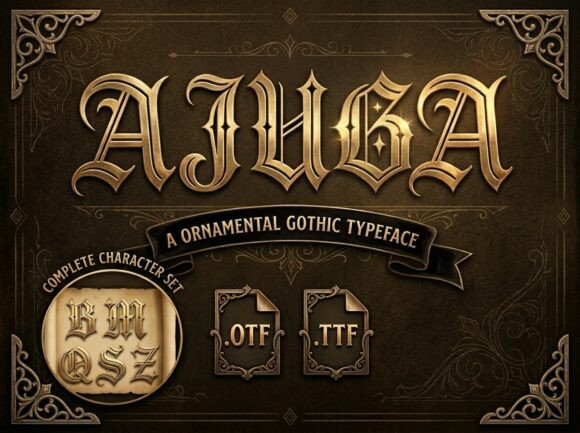
Imagine a typeface that not only commands respect and wonder but also brings a touch of ancient opulence to your designs. Ajuga is that font, a breathtaking ornamental Gothic typeface that stands out with its sharp, dramatic angles and intricate diamond-cut details. Its golden-toned, 3D aesthetic evokes the grandeur of illuminated manuscripts and royal decrees, making it a perfect choice for a wide range of creative projects.
Why Choose Ajuga?
Whether you're designing for a dark fantasy epic, a luxury craft brewery, a heavy metal brand, or high-end vintage packaging, Ajuga provides a legendary presence that is as timeless as it is bold. However, like any powerful tool, it can be misused if not handled with care. Here are some common pitfalls and how to avoid them:
Mistake 1: Overusing Ajuga in Long Texts
While Ajuga is visually striking, it is not designed for long-form text. The intricate details and sharp angles can make it difficult to read in large blocks. Instead, use it for headings, logos, or short, impactful statements.
Better Approach: Balance with Complementary Fonts
Pair Ajuga with a clean, readable serif or sans-serif font for body text. This combination will ensure that your design is both visually appealing and functional. For example, using Helvetica or Georgia for longer paragraphs can complement Ajuga beautifully.
Mistake 2: Ignoring Context and Tone
Ajuga carries a strong, regal, and sometimes even gothic tone. Using it in contexts where a more modern or casual feel is required can create a disconnect. Always consider the overall message and brand identity before incorporating Ajuga.
Better Approach: Align with Brand Identity
Before using Ajuga, review the brand guidelines and the intended audience. If the project calls for a more contemporary or minimalist style, consider other fonts that better align with those requirements. For instance, a tech startup might prefer a sleek, modern font like Futura or Proxima Nova.
Mistake 3: Neglecting Color and Background
The golden, 3D aesthetic of Ajuga is one of its most striking features, but it can be overshadowed or lost on inappropriate backgrounds. Dark, busy, or clashing colors can make the text hard to read and diminish the font's impact.
Better Approach: Choose Complementary Colors and Clean Backgrounds
Select a background that enhances the visibility and elegance of Ajuga. Neutral, solid colors like black, deep blue, or rich burgundy can provide a perfect canvas. Additionally, consider using subtle textures or gradients to add depth without overwhelming the text.
Mistake 4: Not Testing Readability Across Devices
With the rise of mobile and responsive design, it's crucial to test how Ajuga appears on different devices and screen sizes. What looks great on a desktop might not translate well to a smartphone or tablet.
Better Approach: Conduct Cross-Device Testing
Use tools like BrowserStack or Responsinator to preview and test your designs on various devices. Adjust the font size, line height, and spacing to ensure Ajuga remains legible and visually appealing across all platforms.
Mistake 5: Overlooking Licensing and Usage Rights
Font licensing can be a complex issue, and using Ajuga without proper authorization can lead to legal complications. Always check the license terms and ensure you have the right to use the font for your specific project.
Better Approach: Verify Licensing and Purchase Legally
Before downloading or using Ajuga, visit the official website or a reputable font marketplace to purchase the font. Review the license agreement carefully to understand any restrictions or additional costs. This step will save you from potential legal issues and ensure you are supporting the creators of this beautiful typeface.
Final Thoughts
Ajuga is a magnificent typeface that can elevate your designs to new heights. By avoiding common mistakes and following these practical tips, you can harness its full potential and create stunning, effective, and memorable visual experiences. Remember, the key to success lies in thoughtful consideration, careful testing, and a commitment to quality and authenticity.