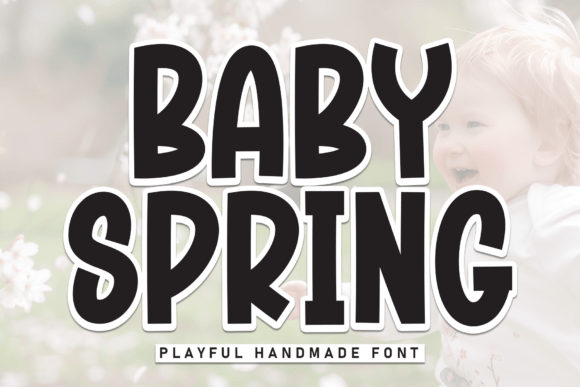
Embrace the Freshness of a New Season with Baby Spring
Welcome to the delightful world of Baby Spring, a playful handmade font that radiates warmth and innocence. This typeface, characterized by its heavy, organic strokes and slightly irregular, bouncy baseline, captures the spontaneous joy of childhood. It's the perfect tool for nursery decor, baby shower invitations, eco-friendly toy branding, and springtime social media graphics. Baby Spring feels as soft and welcoming as a sunny afternoon.
Why Choose Baby Spring?
When it comes to adding a touch of whimsy and charm to your designs, Baby Spring stands out. Its unique, hand-drawn style brings a personal and authentic feel to any project. Whether you're designing for a baby-themed event or simply want to add a fresh, lively element to your work, Baby Spring is an excellent choice.
Avoiding Common Mistakes with Baby Spring
While Baby Spring is a versatile and appealing font, there are some common mistakes that can detract from its effectiveness. Here’s what to watch out for:
Mistake 1: Overusing the Font
One of the most frequent errors is overusing Baby Spring. While it's charming, using it for large blocks of text can make your design look cluttered and unprofessional. Instead, use it for headings, titles, or short, impactful statements.
Mistake 2: Ignoring Context
Another mistake is not considering the context in which Baby Spring will be used. For example, while it's perfect for a baby shower invitation, it might not be the best choice for a corporate report. Always think about the tone and purpose of your design.
Mistake 3: Poor Pairing with Other Fonts
Choosing the right companion fonts is crucial. Baby Spring pairs well with clean, simple sans-serif fonts, but pairing it with another decorative or script font can create visual confusion. Stick to one decorative font and complement it with a more neutral, readable typeface.
Practical Advice for Using Baby Spring Effectively
To get the most out of Baby Spring, follow these practical tips:
- Use it sparingly: Reserve Baby Spring for key elements like headings, logos, or special highlights. This keeps the design balanced and professional.
- Consider the audience: Think about who will see your design. If it's for a baby-related event, Baby Spring is ideal. For more formal or professional settings, opt for a more traditional font.
- Test readability: Before finalizing your design, test how Baby Spring reads at different sizes and on various devices. Ensure it remains legible and visually appealing.
Realistic Examples and Better Approaches
Imagine you’re designing a baby shower invitation. You could use Baby Spring for the main title, such as "Welcome Little One," and pair it with a clean, simple sans-serif font for the date, time, and location details. This combination ensures the invitation is both charming and easy to read.
For a more professional setting, like a brochure for a children’s clothing line, you might use Baby Spring for the brand name and section headers, but choose a more straightforward font for product descriptions and other information. This approach maintains the playful, child-friendly vibe while keeping the content clear and accessible.
Final Checks Before Using Baby Spring
Before you start using Baby Spring in your projects, consider the following:
- Check the license: Ensure you have the appropriate license for the intended use, whether it’s for personal, commercial, or web-based projects.
- Review the font files: Make sure you have all the necessary font files (e.g., OTF, TTF) and that they are compatible with your design software.
- Test on multiple platforms: Verify that Baby Spring looks good and is readable on different devices and screen sizes, including mobile phones and tablets.
By avoiding common pitfalls and following these practical tips, you can harness the full potential of Baby Spring to create designs that are both charming and effective. Embrace the freshness of a new season with this delightful font and let your creativity shine!