Discover the Unique Charm of Darius: A Decorative Display Font
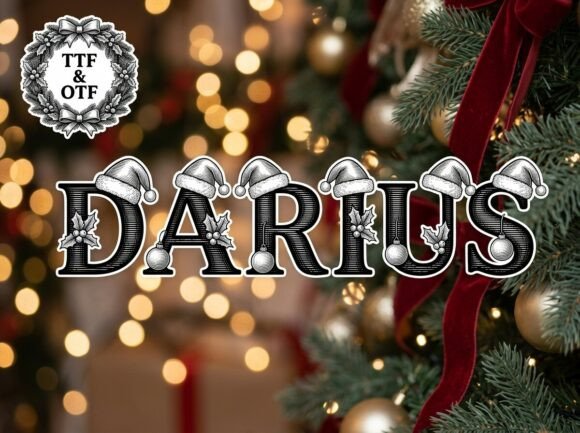
Darius is a striking decorative display font that stands out with its unique artistic elements and strong visual personality. Perfect for creators looking to break away from the ordinary, this font is designed to be the center of attention. Whether you're crafting bold headlines, artistic logos, or creative packaging, Darius offers a versatile and professional finish.
Why Choose Darius?
Darius is not just any font; it's a statement. Its distinctive design makes it ideal for high-impact projects where every letter needs to be a work of art. The font's versatility allows it to be used in various contexts, from branding and marketing to editorial and packaging design. Its polished and professional appearance ensures that your projects look both creative and refined.
Mistake 1: Overusing the Font
One of the most common mistakes is overusing Darius. While it is a beautiful and impactful font, using it excessively can overwhelm the design and make it look cluttered. Tip: Use Darius sparingly, such as for headlines or key sections, and pair it with more neutral fonts for body text.
Mistake 2: Ignoring the All-Caps Design
Darius is an ALL-CAPS uppercase only font. Some users might overlook this and try to use it for lowercase text, which can lead to confusion and a less professional look. Tip: Always remember that Darius is designed for high-impact headlines, logos, and decorative initials. Use it for these purposes to maximize its visual impact.
Mistake 3: Not Considering Compatibility
Another mistake is not checking the compatibility of the font files. Darius comes with both OTF (OpenType Font) and TTF (TrueType Font) files, which are designed for different uses. Tip: Use the OTF file for advanced design and layout software, and the TTF file for universal compatibility across all devices. This ensures that your designs look consistent and professional on all platforms.
Pairing Darius with Complementary Fonts
To create a balanced and visually appealing design, pair Darius with complementary fonts. For example, using a clean, sans-serif font like Helvetica or Arial for body text can provide a nice contrast to the decorative nature of Darius. Example: Use Darius for the main headline and a simple, readable font for the subheadings and body text.
Testing Different Sizes and Spacings
Experiment with different sizes and spacings to find the best fit for your project. Darius can be particularly effective when used at larger sizes, but it's important to test how it looks at various scales. Tip: Start with a large size for headlines and adjust the spacing to ensure readability and visual harmony. This will help you achieve a professional and polished look.
Checking for Legibility
While Darius is visually stunning, it's crucial to ensure that it remains legible, especially in smaller sizes or when used in longer texts. Tip: Test the font in different contexts, such as on a website or in a printed brochure, to ensure that it is easy to read. If legibility is an issue, consider using Darius for shorter, more impactful text and a more legible font for longer passages.
Final Thoughts
Darius is a powerful and versatile font that can add a unique and artistic touch to your projects. By avoiding common mistakes and following practical advice, you can make the most of this stunning font. Remember to use Darius judiciously, pair it with complementary fonts, and always check for legibility and compatibility. With these tips in mind, you'll be well on your way to creating visually impressive and professional designs.